
How much does a custom CRM cost, and is it worth it?
A custom CRM costs more upfront than signing up to HubSpot, Zoho or Salesforce, but it has no per-user licence fees and fits your process exactly. The price depends on how many lead sources, workflows, integrations and user roles it needs. It usually pays off when your process doesn't fit a standard CRM, your team is growing, or you're paying for several tools that don't talk to each other.
What drives the cost of a custom CRM?
There's no fixed price because no two sales processes are the same. These are the factors that make the biggest difference to a quote, roughly in order of impact:
| Cost driver | Why it matters | Impact |
|---|---|---|
| Workflows and statuses | Each stage, rule and automation (reminders, assignments, emails) needs design, building and testing. | High |
| Integrations | Pulling leads from your website, Meta lead forms or Google Ads, or syncing with accounting, adds connection and testing work per tool. | High |
| User roles and permissions | Admins, sales and operations seeing different things means more screens and security rules. | Medium |
| Reporting and dashboards | Marketing reports, pipeline views and exports are often where the value is, and where the work is. | Medium |
| Data migration | Importing years of spreadsheets or another CRM's records, cleaning duplicates and mapping fields. | Medium |
| Mobile or field use | Working on a phone or tablet, or offline on site, adds design and sync work. | Medium |
| Hosting, backups and support | An ongoing cost, usually small compared with the build, but it should be in the plan from day one. | Low, ongoing |
The most effective way to control cost is to build in phases: start with the lead inbox, statuses and reminders your team needs every day, use it for a few weeks, then add reporting and integrations once you know what matters.
What does an off-the-shelf CRM really cost?
The monthly price on a CRM's pricing page is rarely the full cost. When you compare options, count all of these over three to five years:
- Per-user licences, which grow every time you hire.
- Higher plan tiers needed to unlock automation, reporting or more custom fields.
- Paid add-ons and connectors for the tools you already use.
- Setup and customisation, often by a consultant, to bend the CRM to your process.
- Staff time spent on workarounds where the CRM doesn't fit, such as double entry or spreadsheets on the side.
A custom CRM swaps most of these for a one-off build plus modest hosting and support. The right choice is the one with the lower total cost of ownership for your team size and process, not the one with the lower first invoice.
Custom CRM vs off-the-shelf: which should you choose?
| Off-the-shelf (HubSpot, Zoho, Salesforce) | Custom CRM | |
|---|---|---|
| Upfront cost | Low | Higher |
| Ongoing cost | Per user, per month, rising with your team | Hosting and support, not per user |
| Time to start | Days | Weeks for a first version |
| Fit to your process | You adapt to the software | The software adapts to you |
| Integrations | Large marketplace, sometimes paid | Built for exactly the tools you use |
| Ownership | You rent it | You own the code and the data |
When does a custom CRM pay off?
- Your sales process has steps a standard CRM can't model well, such as site visits, assessments or multi-stage quotes.
- You're paying for a CRM plus several other tools, and staff copy information between them.
- Per-user pricing is starting to hurt as the team grows.
- You want marketing data (Google Ads, Meta, Search Console) next to the leads it produced, in one place.
- Customer data must stay under your control, with exactly the access rules you choose.
How to get an accurate quote for a custom CRM
- 01
Write down your process
From first enquiry to paid job: who does what, what gets missed and where data lives today.
- 02
List your lead sources and tools
Website forms, phone, Meta lead ads, email, accounting. Each one is a potential integration.
- 03
Separate must-haves from nice-to-haves
The must-haves are your first phase. Everything else can wait for real usage data.
- 04
Ask for a fixed scope
A written scope, timeline and cost per phase, so there are no surprises.
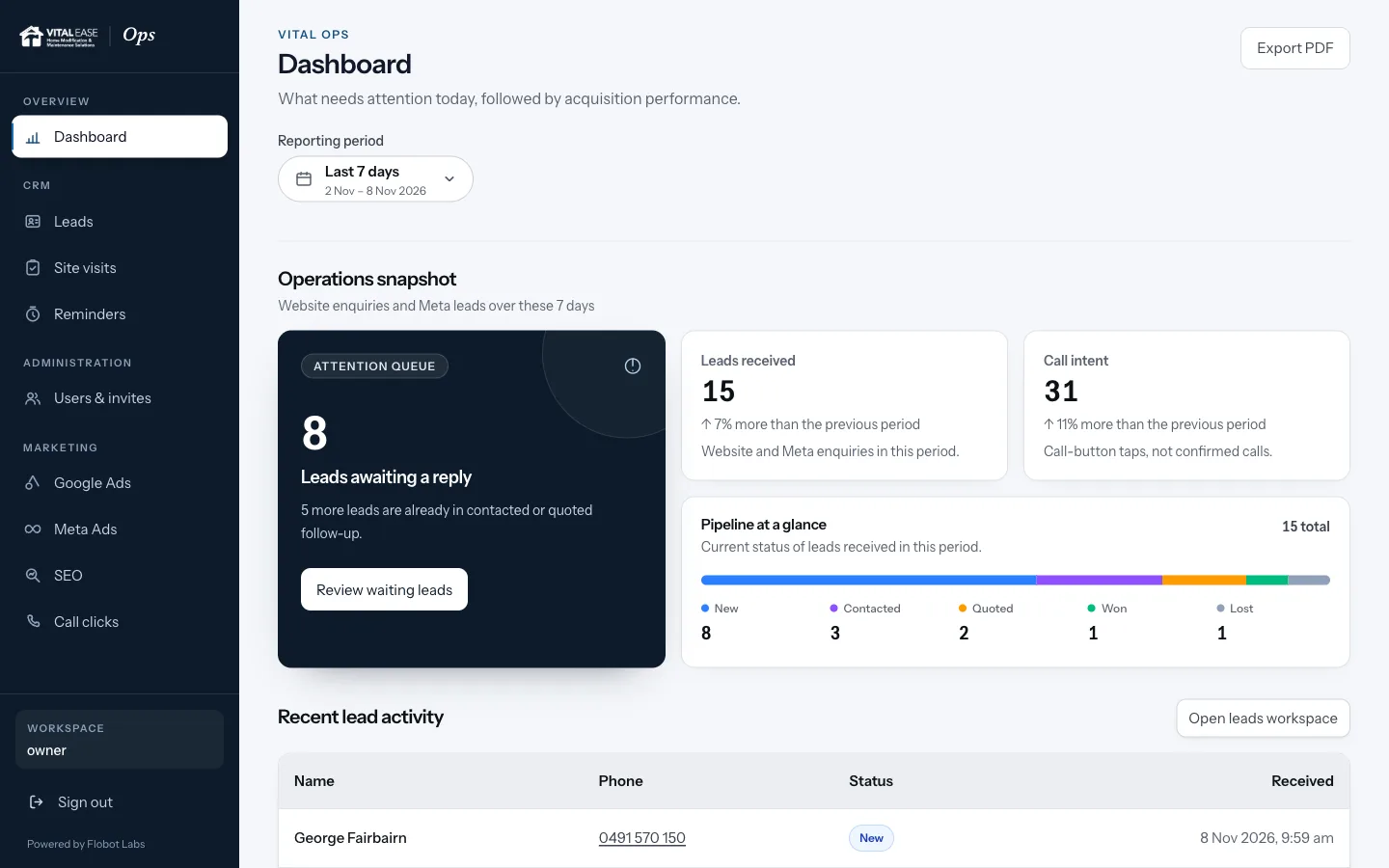
For Vital Ease we built Vital Ops: website and Meta leads in one list, statuses and notes, emailed reminders, call tracking and marketing reports beside the leads, plus a site-assessment tool for their field team. It was built in phases, starting with the lead inbox.
Read the case studyCommon questions
How long does it take to build a custom CRM?
A focused first version, covering the lead inbox, pipeline and reminders, usually takes weeks rather than months. Reporting, integrations and mobile features are added in later phases.
Can a custom CRM import our existing leads?
Yes. Leads from spreadsheets or another CRM are imported, cleaned and de-duplicated as part of the move, so nothing is lost.
Is it better to customise HubSpot or Zoho instead?
Sometimes. If your process is mostly standard, customising an existing CRM is quicker and cheaper. If you'd need heavy customisation, expensive tiers and paid connectors to make it fit, a custom build often costs less over a few years.
Who owns the CRM and the data?
You do. The code is built for you and the data stays yours, whether we keep hosting and maintaining it or hand it to your team.